The Government of Punjab has introduced the Ramadan Nigehban Card to provide Rs10000 financial assistance to deserving families. If you have received your card, the next important step is generating your PIN to access the funds safely.
This guide explains the complete, updated, and easy process to set your PIN and withdraw your amount without confusion.
What Is Ramadan Nigehban Card?
The Ramadan Nigehban Card is a financial support card issued to eligible low-income families in Punjab. It allows beneficiaries to:
-
Withdraw Rs10000 cash
-
Make payments at selected merchants
-
Use ATM services
-
Complete biometric verification through authorized agents
This card is issued for financial relief during Ramadan.
Why PIN Generation Is Important
Your PIN (Personal Identification Number) protects your card. Without setting a PIN:
-
You cannot withdraw cash from ATM
-
You cannot complete secure transactions
-
Your card may remain inactive
Always keep your PIN confidential.


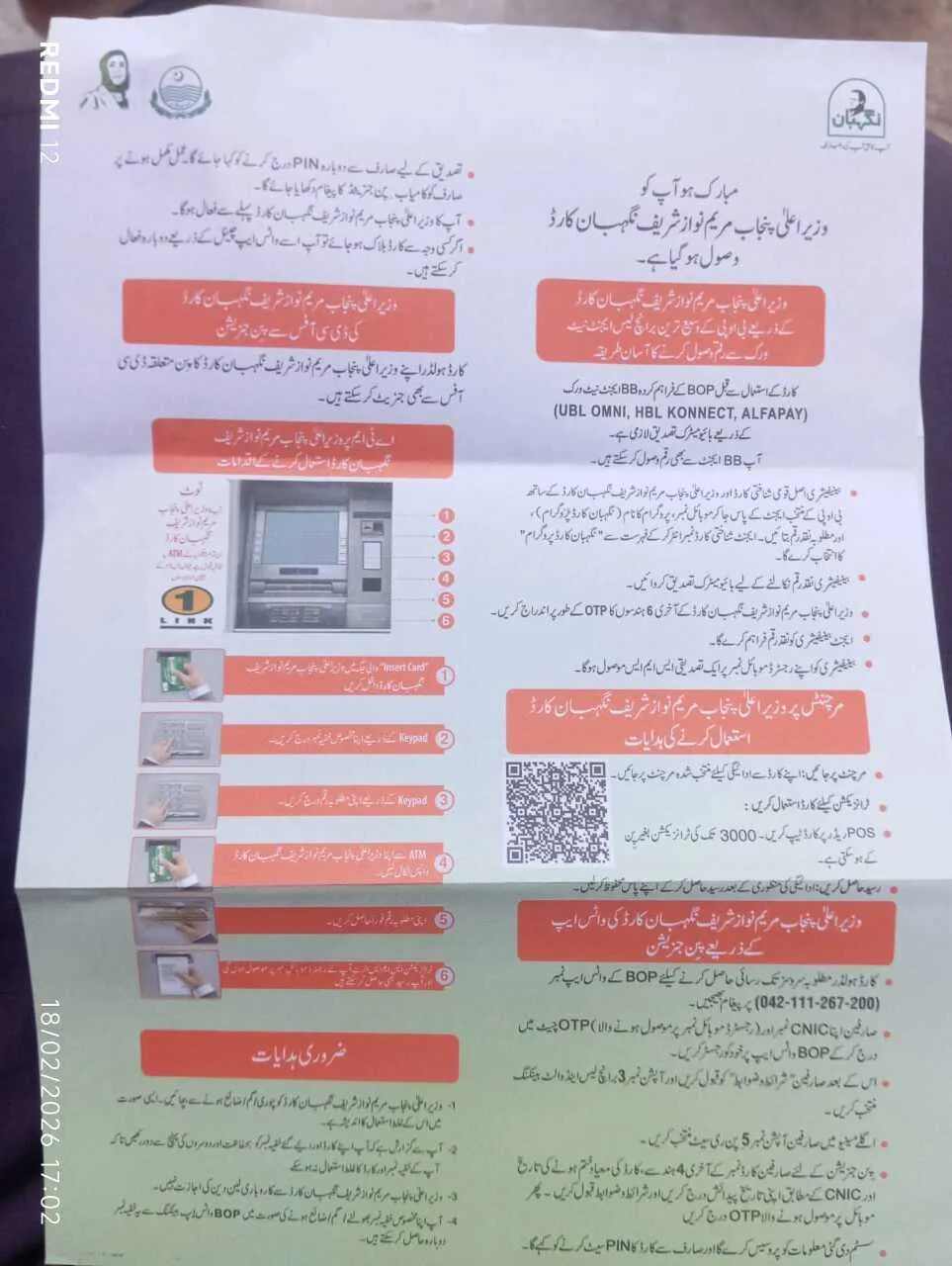
Method 1: Generate PIN Through BOP WhatsApp (Official Method)
This is the easiest and most recommended method.
Step-by-Step Process:
-
Save BOP WhatsApp number: 042-111-267-200
-
Send message from your registered mobile number.
-
Type CNIC and send.
-
Accept terms and conditions.
-
Select option related to Nigehban Card Banking.
-
Choose PIN Set option.
-
Enter required details:
-
Last 4 digits of your card
-
Card expiry date
-
Your CNIC number
-
-
Enter OTP received on your mobile.
-
Create a new 4-digit PIN.
-
Confirm the PIN again.
You will receive a confirmation message once your PIN is successfully generated.
Method 2: Generate PIN via Authorized BOP Agent
You can visit biometric verified agents like:
-
UBL Omni
-
HBL Konnect
-
Alfa Pay
Required Documents:
| Required Item | Why It Is Needed |
|---|---|
| Original CNIC | Identity verification |
| Nigehban Card | Card validation |
| Registered Mobile | OTP confirmation |
The agent will complete biometric verification and help you set your PIN securely.
How to Withdraw Rs10000 After PIN Generation
Once your PIN is active, you can withdraw money using:
-
ATM Machine
-
BOP Authorized Agent
ATM Withdrawal Steps:
-
Insert your card.
-
Select language.
-
Enter your 4-digit PIN.
-
Choose account type.
-
Select amount.
-
Collect cash and receipt.
Using Nigehban Card at Merchant Shops
You can also use your card at selected POS machines.
-
Transactions up to Rs3000 may not require PIN.
-
Swipe the card on POS.
-
Always collect receipt.
-
Do not transfer funds to other accounts.
Biometric Verification Requirement
Before first withdrawal, biometric verification is mandatory through authorized agents. This ensures:
-
Only real beneficiary uses the card
-
Fraud prevention
-
Secure fund distribution
Registration at DC Office (If Needed)
If you face issues:
-
Visit your nearest DC Office
-
Bring CNIC and Nigehban Card
-
Officials will assist in activation or reactivation
This facility is available across Punjab.
What To Do If Card Gets Blocked
If your card is blocked:
-
Use BOP WhatsApp service to reactivate
-
Or visit authorized agent
-
Contact official helpline
Never share your OTP or PIN with anyone.
Important Safety Instructions
-
Card is non-transferable
-
Do not give card to others
-
Misuse of card is a punishable offense

-
Report lost card immediately
Common Problems and Quick Solutions
| Problem | Solution |
|---|---|
| OTP not received | Check registered mobile number |
| Biometric failed | Visit another authorized agent |
| PIN not accepted | Reset via WhatsApp |
| Card blocked | Contact BOP immediately |
Eligibility Reminder
This card is issued only to verified deserving families. If you did not receive a card, contact local administration for verification.
Latest Update for Ramadan 2026
The Rs10000 assistance is being distributed in phases. Beneficiaries are advised to:
-
Activate PIN immediately
-
Avoid last-day rush
-
Follow official channels only
Always rely on official BOP and Punjab Government communication.
Questions
How can I generate PIN for Ramadan Nigehban Card?
You can generate your PIN using BOP WhatsApp service or by visiting an authorized biometric agent.
Is biometric verification compulsory?
Yes, biometric verification is required before first withdrawal.
Can I withdraw full Rs10000 at once?
Yes, you can withdraw full amount after PIN activation.
What if I forget my PIN?
You can reset it through official WhatsApp service.
Can someone else use my card?
No, the card is strictly non-transferable.
Final Words
Generating your PIN for the Ramadan Nigehban Card is simple if you follow the official method. Always use authorized channels, keep your PIN secure, and complete biometric verification on time.
This financial support is designed to help deserving families during Ramadan. Activate your card today and receive your Rs10000 without delay.